Start free trial
For business owners

See who visits your website, and where they found you.

Google, Instagram, Facebook, your Google listing, Yelp, a flyer in the window: Traffic Window shows which ones bring people to your website, and what they did next. No technical knowledge needed.

$5.99 a month on the Solo plan. Cancel any time.

Works with Google Analytics. Sign in with Google and your website is added for you.
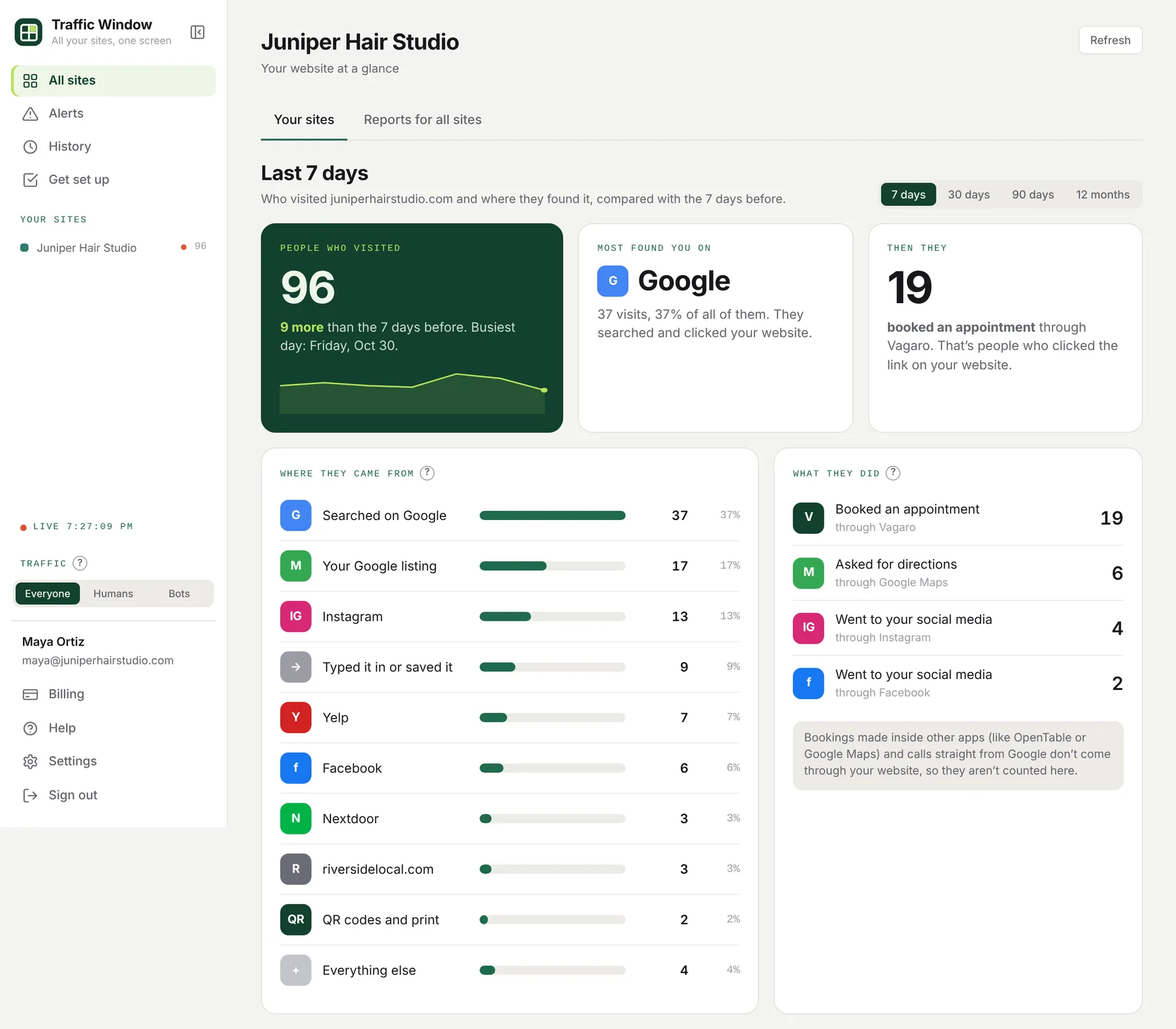
Traffic Window for a made-up hair salon: 96 people visited in the last 7 days, most found it on Google, 19 booked an appointment, and a list of where they came from with an icon for each: Google, the Google listing, Instagram, Yelp, Facebook, Nextdoor and more
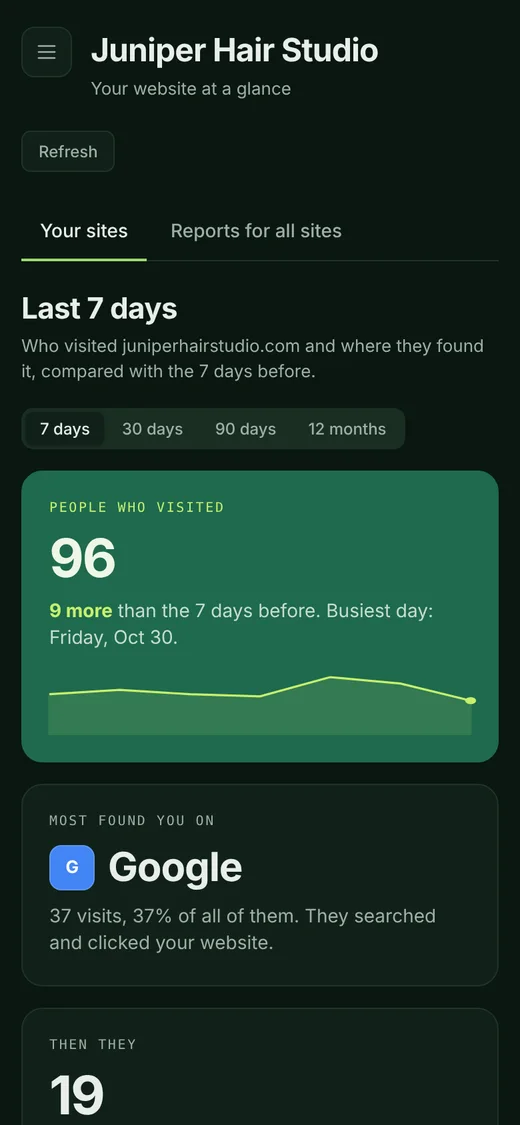
The same page on a phone, in the dark theme
Works with Google Analytics

Sign in with Google. Your website shows up by itself.

Already have Google Analytics? Press Continue with Google, tick your website, and you are done. No codes to copy, no settings to find.

  • We list every website in your Google Analytics
  • Tick the ones you want and press Add sites
  • Your numbers start showing straight away
Continue with Google

How it works, and how to remove us

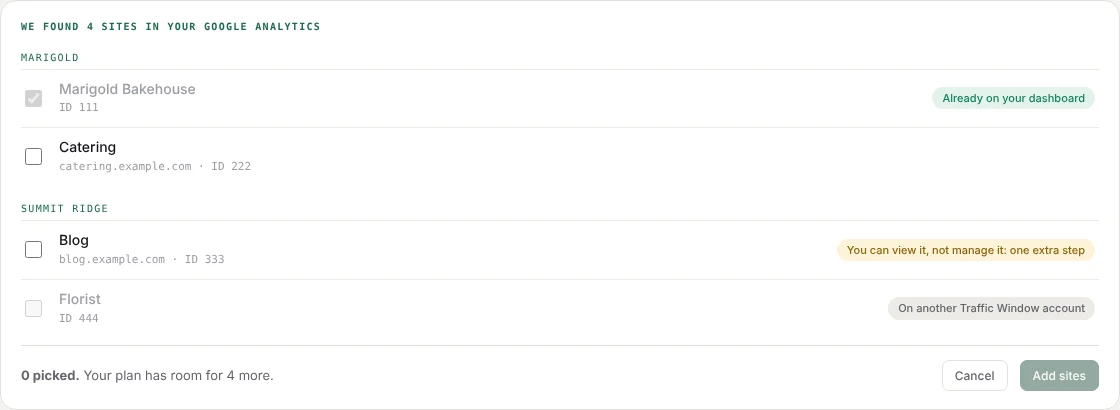
Pick your sites: every website in your Google Analytics, with a tick box next to each

What happens when you press Continue with Google

  1. You sign in to GoogleGoogle's own screen asks if Traffic Window may see your Google Analytics and add a user to it. You choose yes or no.
  2. We list your sitesWe show every site in your Google Analytics. You tick the ones you want, like your website.
  3. We add ourselves as a ViewerOn just the sites you ticked, we add our read-only email as a Viewer, the same as adding a colleague.
  4. We let go of your sign-inAs soon as the sites are added, we hand your Google sign-in back to Google. We never keep it.

After that, we only read. We read visitor numbers through our Viewer email. A Viewer can't change your settings, see the rest of your Google account, or touch your website.

To remove us, go to Google Analytics, not Traffic Window. Open Admin > Property access management, find our email and remove it. Removing a site from Traffic Window, or cancelling, leaves our Viewer in place until you do.

Every place people find you

By name, in plain words.

Not "organic social" or "referral". You see the actual places: the ones you know, and some you didn't know were sending you customers.

GSearched on Google
MYour Google listing
IGInstagram
fFacebook
YYelp
TTTikTok
NNextdoor
AIChatGPT
BSearched on Bing
Y!Searched on Yahoo
@Email
QRQR codes and print
OTOpenTable
TATripadvisor
AAngi
WAnother website
→Typed it in or saved it
Page names

Your pages, with names you'd actually say.

Google Analytics lists your pages by their long titles, or by web addresses like /index.html. Traffic Window lets you give each page a short name, like Home, Menu or Book a cake. You choose every name, and the page's full address is always right underneath.

What Google Analytics shows
Maple Street Bakery | Fresh Bread & Pastries in Portland, OR641
/index.html171
Our Menu – Breads, Pastries, Cakes & Seasonal Specials – Maple Street Bakery344
/recipes/sourdough-starter-guide88
/recipes/cinnamon-rolls-overnight64
/recipes/rye-bread-for-beginners58
Custom Cake Order Form – Maple Street Bakery96
Pages · last 30 days
Home ✎maplestreetbakery.com/ ↗Counted with /index.html: one page
812
Menu ✎maplestreetbakery.com/menu ↗
344
Recipes 3 pagesmaplestreetbakery.com/recipes/… ↗A folder of pages on one line
210
Book a cake ✎maplestreetbakery.com/cake-order ↗
96

Tap the ✎ next to any page to name it. The arrow opens the page itself.

Name any page in a tap

Tap the pencil next to a page and type a name. Or open Settings to see every name in one place, and rename or remove any of them.

Shorter names, if you want them

"Find shorter names" looks at your busiest pages and suggests a name for each. Nothing is ticked to start. You tick the ones you like and save them all at once.

Tidy lists

Two addresses that are really one page, like / and /index.html, count as one. A folder of recipes, products or blog posts can sit on one line.

You decide every name.Traffic Window never renames or groups a page on its own. Change your mind any time.
Your website doesn't change.The names are only in Traffic Window. Your pages and their addresses stay exactly as they are.
The same names everywhere.The Pages tab, the Summary and the reports you email all use your names.
What you get

Three answers, on one page.

How many people visited

This week, this month or this year, compared with the time before, and your busiest day.

Where they found you

Google search, your Google listing, Instagram, Facebook, Yelp, emails, QR codes and other websites, each by name.

What they did next

How many clicked to book, order, buy tickets or get directions, through OpenTable, DoorDash, Vagaro, Google Maps and the like.

How it works

We walk you through it, one step at a time.

Traffic Window reads Google Analytics, Google's free visitor counter. If your website doesn't have it yet, the guided setup gets it there in about 15 minutes.

Step 1

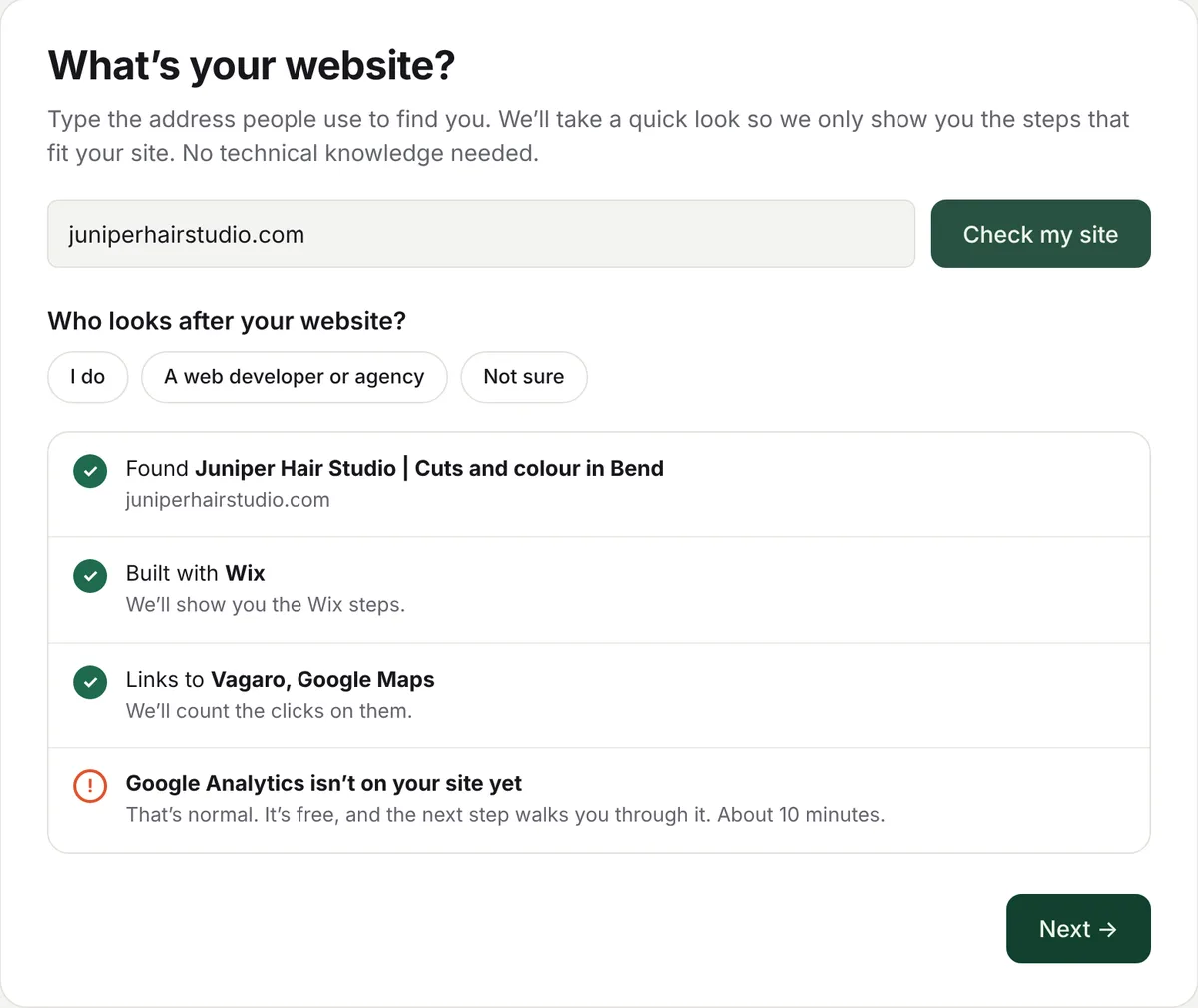
Type your website address. We look at it for you.

We check which company made your website, whether Google Analytics is already on it, and which booking, ordering and map links it has. Then we only show you the steps that fit.

  • Squarespace, Wix, WordPress, Shopify, GoDaddy, Webflow and Square Online, with the exact buttons to click
  • Websites run for you by companies like Toast, BentoBox or Popmenu: we tell you what to ask them
The website check for a made-up hair salon: built with Wix, links to Vagaro and Google Maps, and Google Analytics not on the site yet
Step 2

Someone else looks after your website? We write the email.

Type their email address and press Send. They get your Google Analytics code and the exact steps for your kind of website. It takes them a few minutes. When you come back, we check your website and tell you when it's working.

"I made it myself"

Click-by-click steps for your website builder, with your own code filled in.

"A web developer looks after it"

One button sends them everything they need. No jargon for you to pass on.

"A company runs it for me"

We give you the one sentence to send their support team.

Step 3

Make every link count.

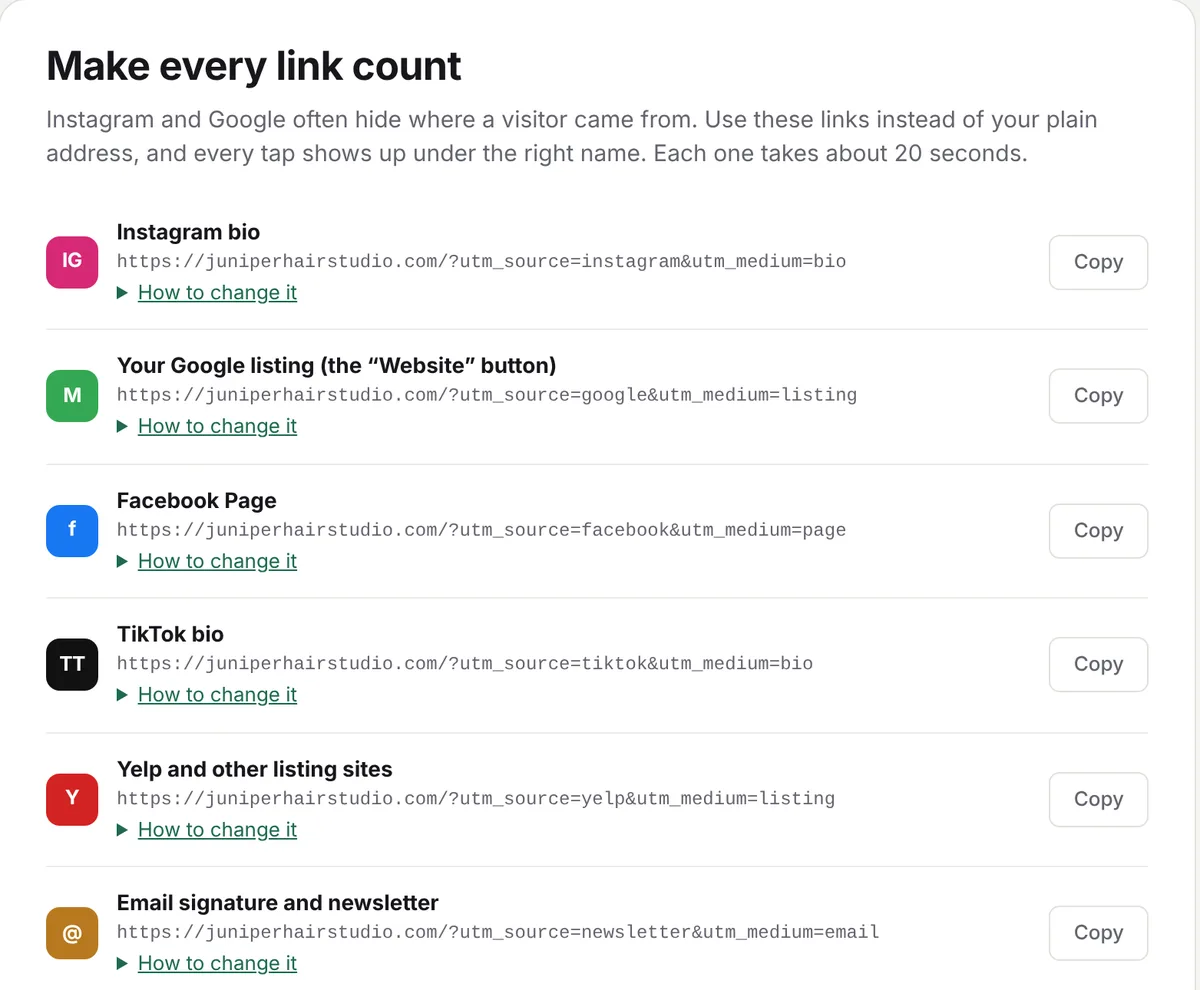
Instagram and some apps hide where a visitor came from. We give you ready-made links for your Instagram bio, Google listing, Facebook Page, Yelp and emails, and a QR code for signs, cards and flyers. Use them and each one shows up by name. You can also make your own, with any name you like. How tagged links work

Ready-made links to copy, one each for the Instagram bio, the Google listing, the Facebook Page, TikTok, Yelp and emails
Then

Look any time on your phone. Or get a short email every Monday.

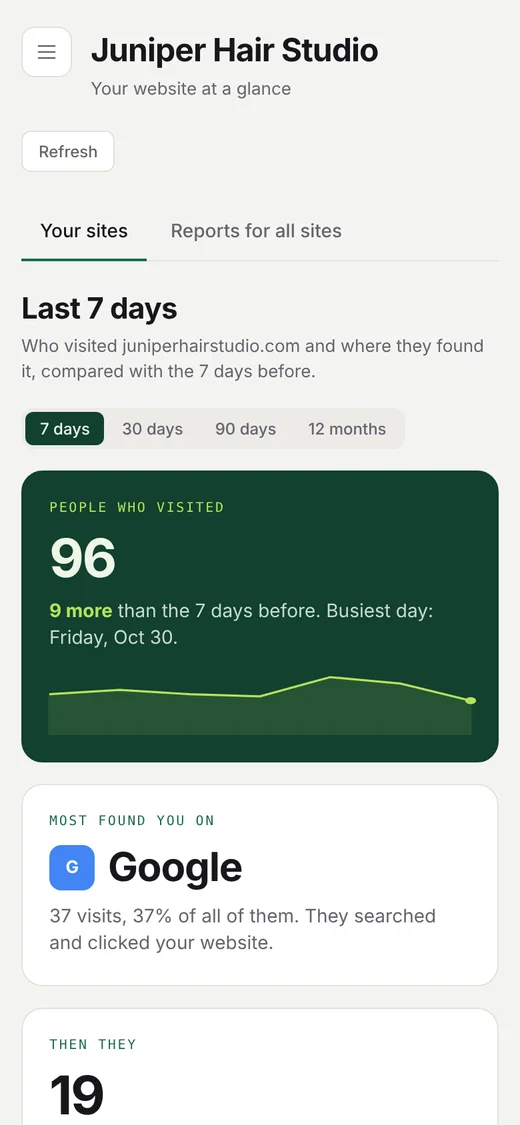
Everything works on a phone, in light or dark, with nothing to install. Or turn on the weekly summary and you don't even need to sign in: how many people visited, where they found you and what they did, in your inbox every Monday morning.

The page on a phone, light theme: 96 people visited, most found it on Google
Light
The same page on a phone, dark theme
or dark
Who it's for

Any business with a website.

Restaurants, cafés and bars

Did that Instagram post fill tables? How many clicked through to book or order?

Salons, studios and gyms

See which posts, listings and flyers turn into bookings.

Shops and makers

Know whether people come from Google, Instagram, Etsy or the newsletter.

Trades, clinics and offices

Google listing, Nextdoor, Angi or word of mouth: find out what's working.

Questions

Good to know

What does Connect Google do to my Google Analytics?

It adds our read-only email as a Viewer on the sites you tick, and nothing else. We use your Google sign-in only for those few minutes and never keep it. To remove us later, go to Google Analytics, open Admin, then Property access management, and remove our email. Removing a site from Traffic Window does not remove it for you.

Do I need any technical knowledge?

No. The guided setup tells you what to click, one step at a time. If someone else looks after your website, we write the email to them for you.

Do I need Google Analytics?

Yes, and it's free. Traffic Window reads your numbers from it. If you don't have it yet, the setup walks you through making it, which takes about five minutes, and then putting it on your website.

Will it change my website?

No. Traffic Window only reads your visitor numbers. It can't change your website or your Google account. If you use Connect Google, the one thing it adds in Google Analytics is our read-only Viewer. The only change to your website is the Google Analytics code, which you (or your web person) add once.

How much does it cost?

$5.99 a month on the Solo plan, or $59.99 a year. That covers up to five websites, so a second business or a second location costs nothing extra. Cancel any time.

Can I see who my visitors are?

No, and nobody can. You see numbers, towns and where people came from, never names or email addresses.

Why don't I see every booking?

We count people who click your booking, ordering or map links on your website. Someone who books inside the OpenTable app, or calls you straight from Google, never visits your website, so check those in that company's own account.

Find out where your customers come from.

$5.99 a month. No technical knowledge needed.

Start free trial