Start free trial
For web designers who look after their clients' sites

All your clients' websites on one screen. Reports that send themselves.

Stop logging in to Google Analytics twenty times. Traffic Window shows every site you look after, live, side by side, and emails each client a clear PDF report every week or month, with your name on it.

From $5.99 a month for up to 5 sites. Save 17% when you pay yearly. Cancel any time.

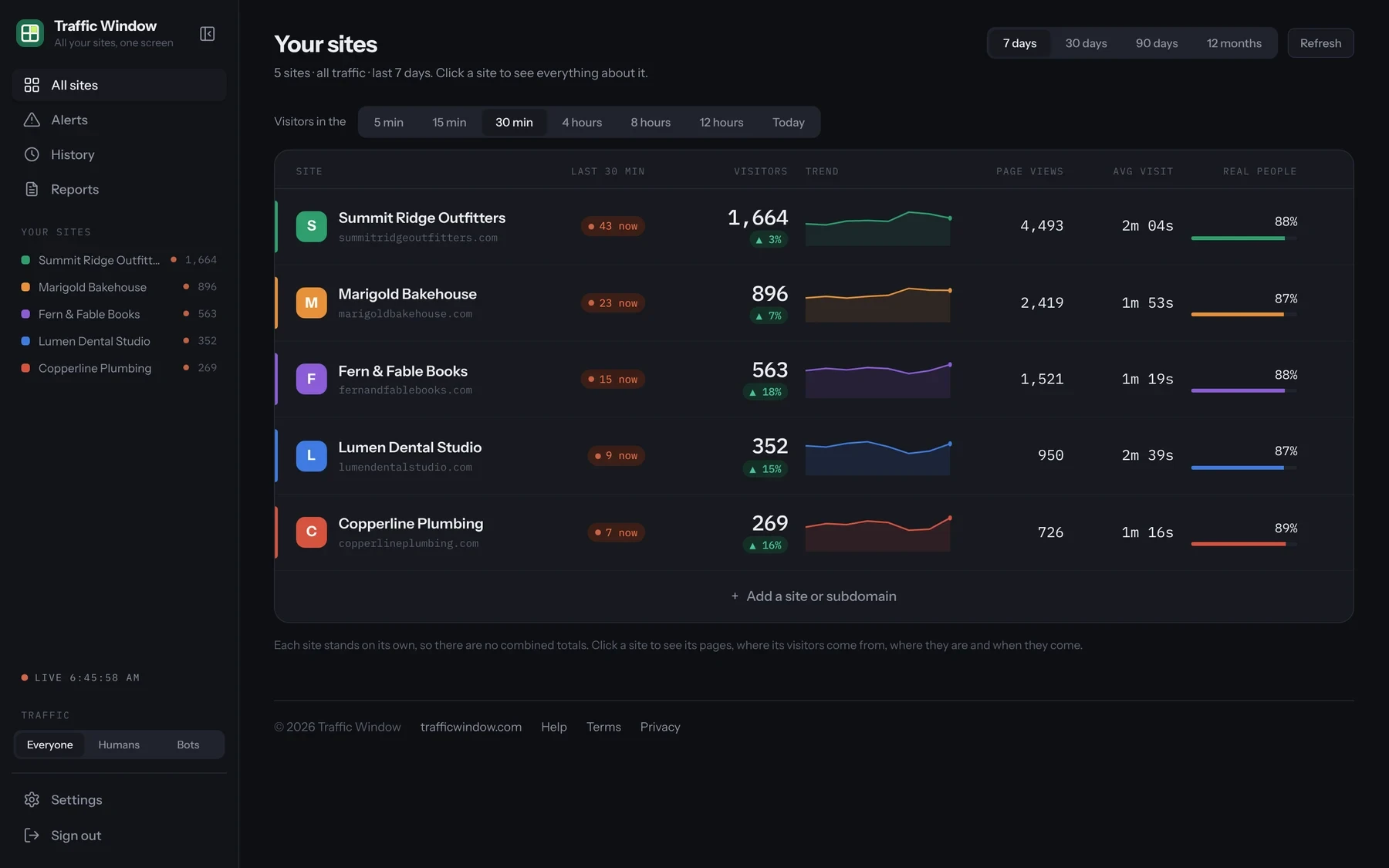
The Traffic Window home screen: five client websites in a list, each with live visitors, visitors this week, a trend line, page views, average visit and the share of real people
Sound familiar?

"How's my website doing?"

Every client asks. Answering means logging in to their Google Analytics, digging through menus, taking screenshots and pasting them into a document. Do that for 20 clients and it's a day gone, so most of them never get a report at all.

The way it's done now

  • One Google Analytics login per client, checked one at a time
  • Screenshots pasted into a Word document each month
  • Reports full of jargon your client doesn't read
  • You hear a site has gone quiet when the client calls

With Traffic Window

  • Every client site on one live screen, updated every 30 seconds
  • A clear 3-page PDF report emailed on schedule, on its own
  • Plain words a busy business owner understands
  • Alerts when a site's traffic drops, before the client notices
What you get

Everything you check every day, and everything your clients want to know.

Every client on one wall

Live visitors, page views, average visit and trend for every site in one list. Click any site for the full story.

Client reports

A one-page snapshot, a full 3-page report, and reports on traffic sources, pages and results. What you see on screen is the PDF your client gets.

Reports that send themselves

Daily, weekly or monthly, at the time you choose, to up to six people per report. Set it once and forget it.

Real people, not bots

See what share of each site's traffic is real. One switch hides the bots, and reports count real people only.

Every channel, in plain words

Search, social, email, ads and other websites, each compared with the period before. Show clients what's working.

Alerts that matter

Traffic dropped sharply? A wave of bots? A site stopped reporting? You see it first, not your client.

Client reports

The report your clients actually read.

Written in plain English, laid out for print, and delivered without you lifting a finger.

Page 1

The answer to "how's my website doing?"

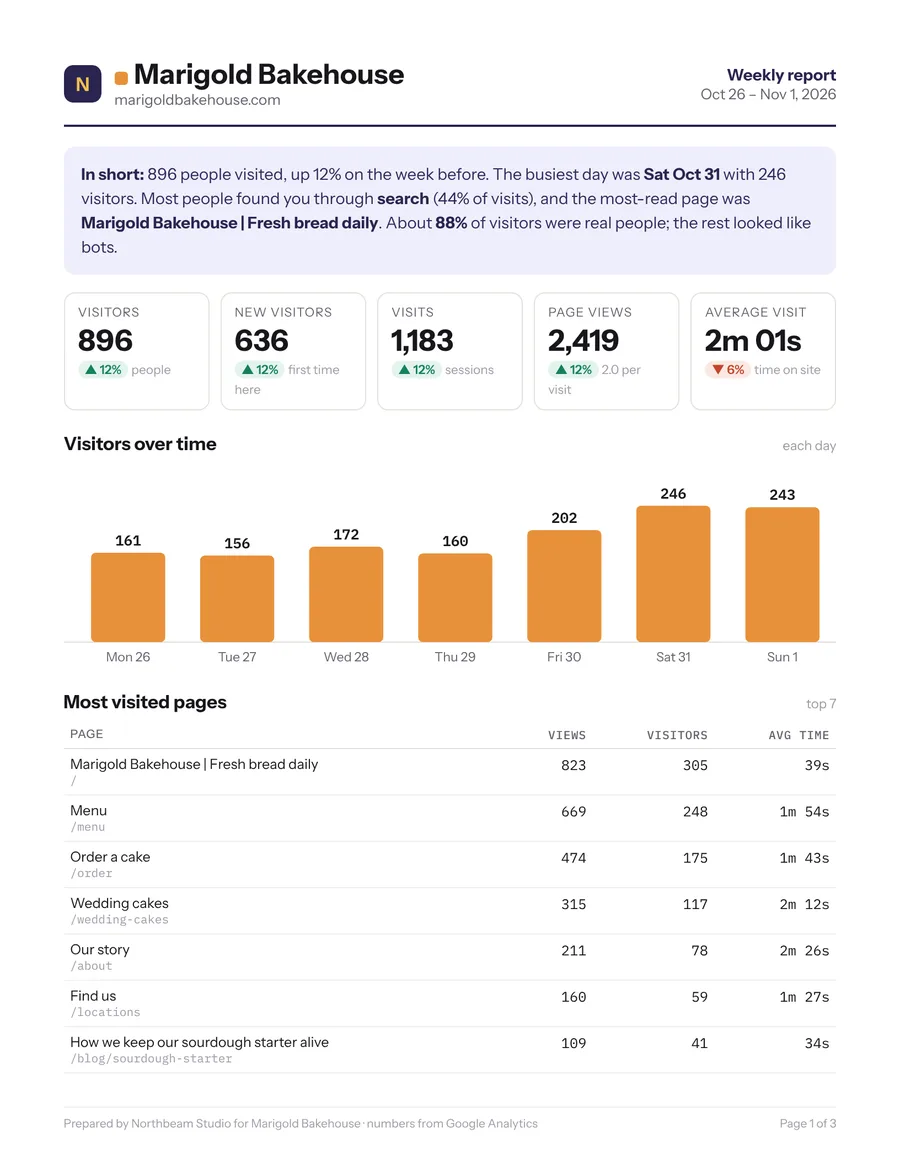
An "In short" paragraph a busy owner can read in ten seconds, then the five numbers that matter, each compared with the period before. Visitors day by day, and the most visited pages.

  • Yesterday, last week, last month, 90 days or the year
  • Letter size, ready to print, save or forward
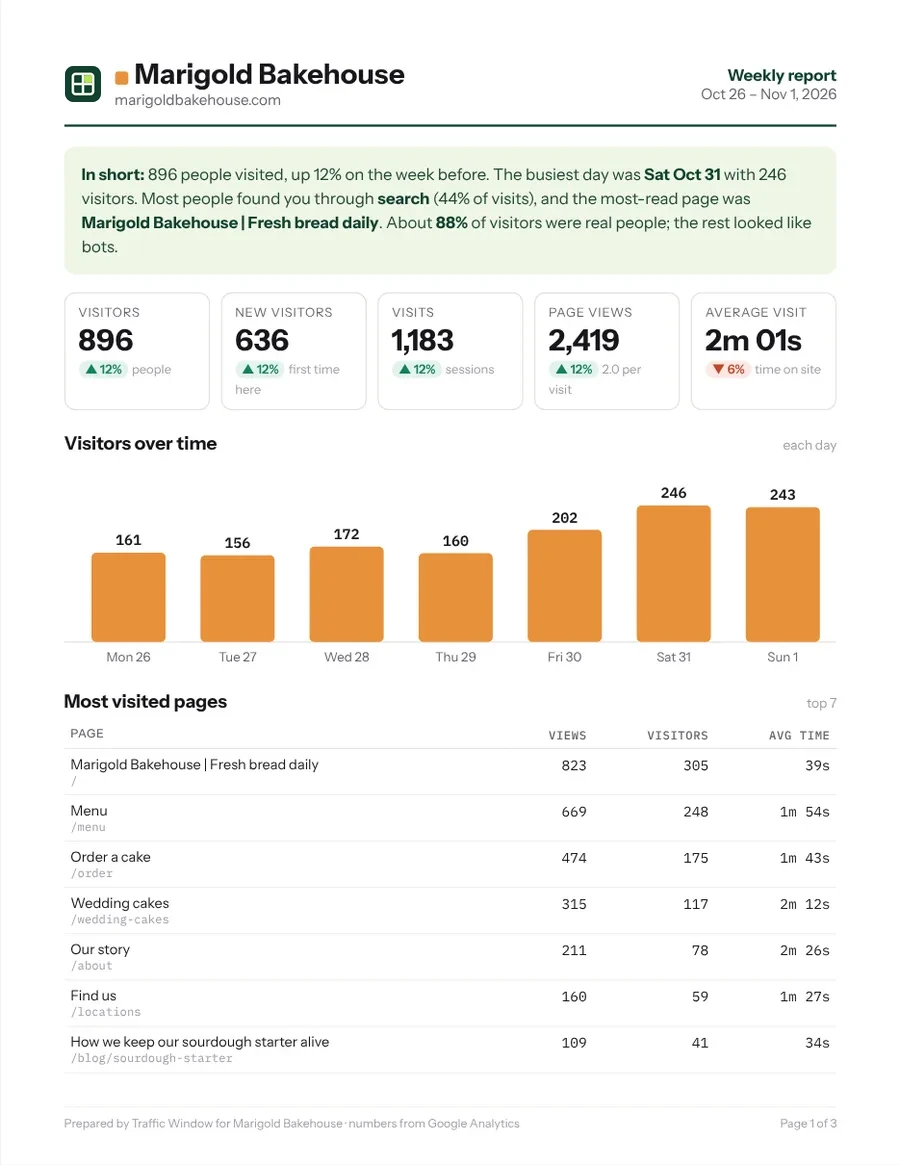
Page 1 of a weekly report for Marigold Bakehouse: an In short summary, five numbers with changes, a bar chart of visitors each day and the most visited pages
Pages 2 and 3

How people found the site, and how each channel did.

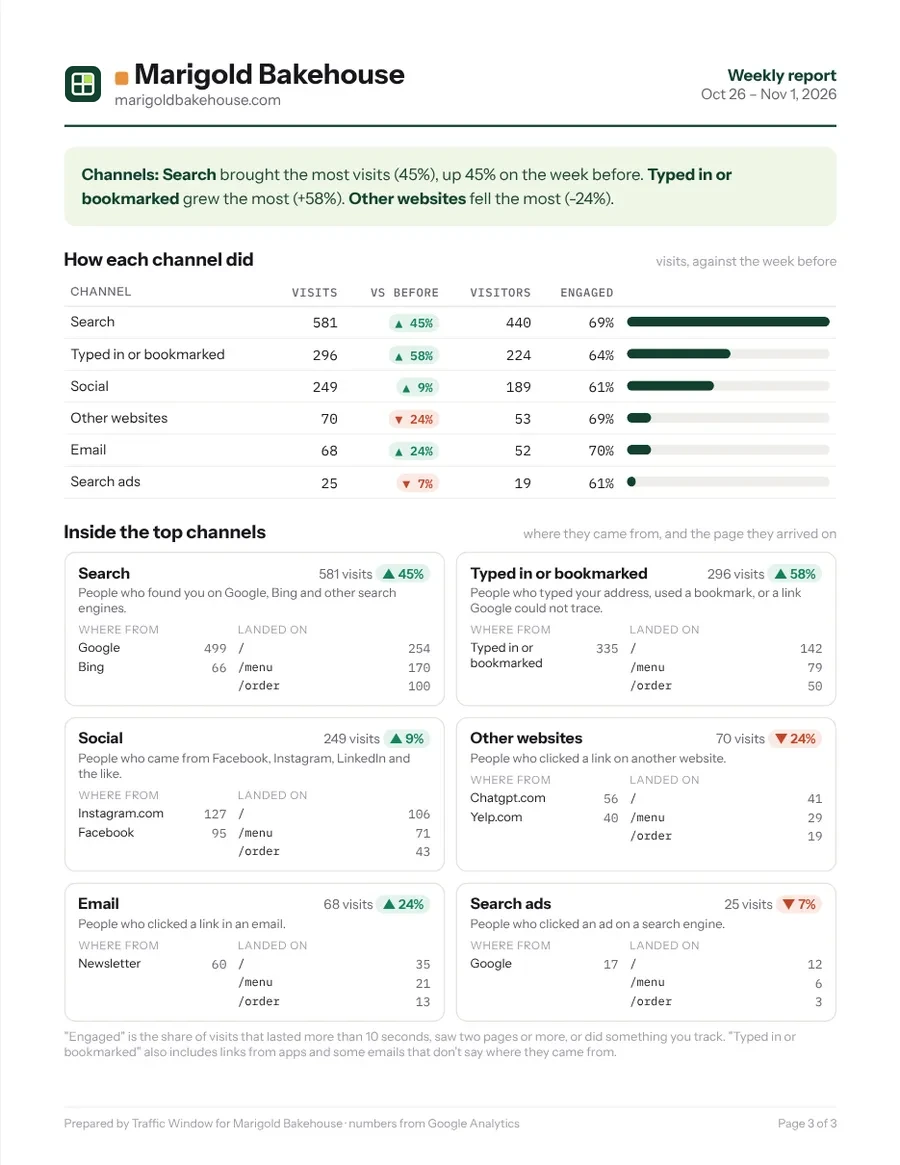
Where visitors came from, the cities they're in, phone or computer, real people against bots, and the busiest days and hours. Page 3 takes each channel in turn, search, social, email and the rest, with its change from last period, its sources and the pages people landed on.

Page 3 of the report: a table of channels with visits and change from the week before, and a card for each channel showing its sources and landing pages
Emailed reports

Set it once. It goes out every week.

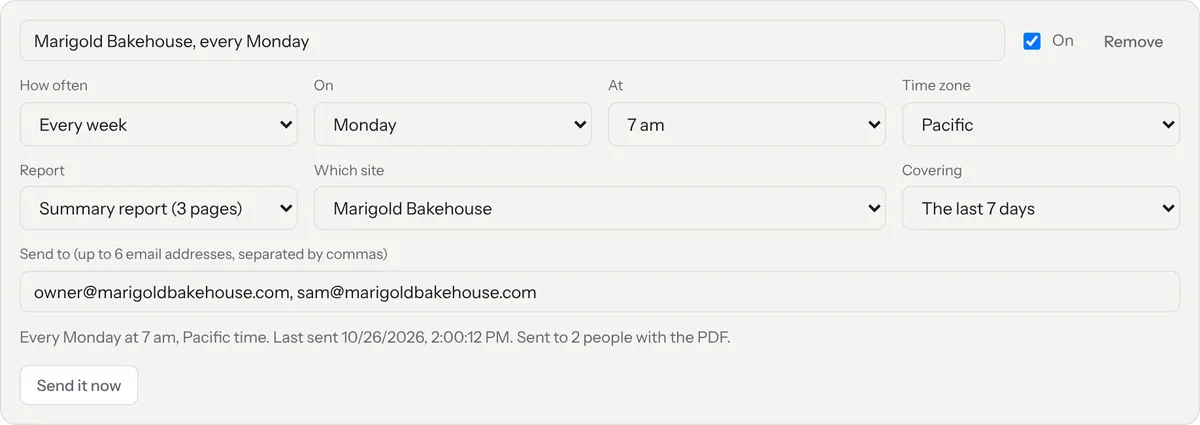
Pick the site, how often (every day, every week on a chosen day, or every month on a chosen date), the time and time zone, and up to six email addresses. Your client, their office manager, their marketing person: anyone, at any address.

  • "Send it now" to try it before the first one goes out
  • See when each report last went, and to whom
A scheduled report: Marigold Bakehouse, every Monday at 7 am Pacific, the summary report covering the last 7 days, sent to two email addresses, last sent October 26
The email

A good-looking email, with the PDF attached.

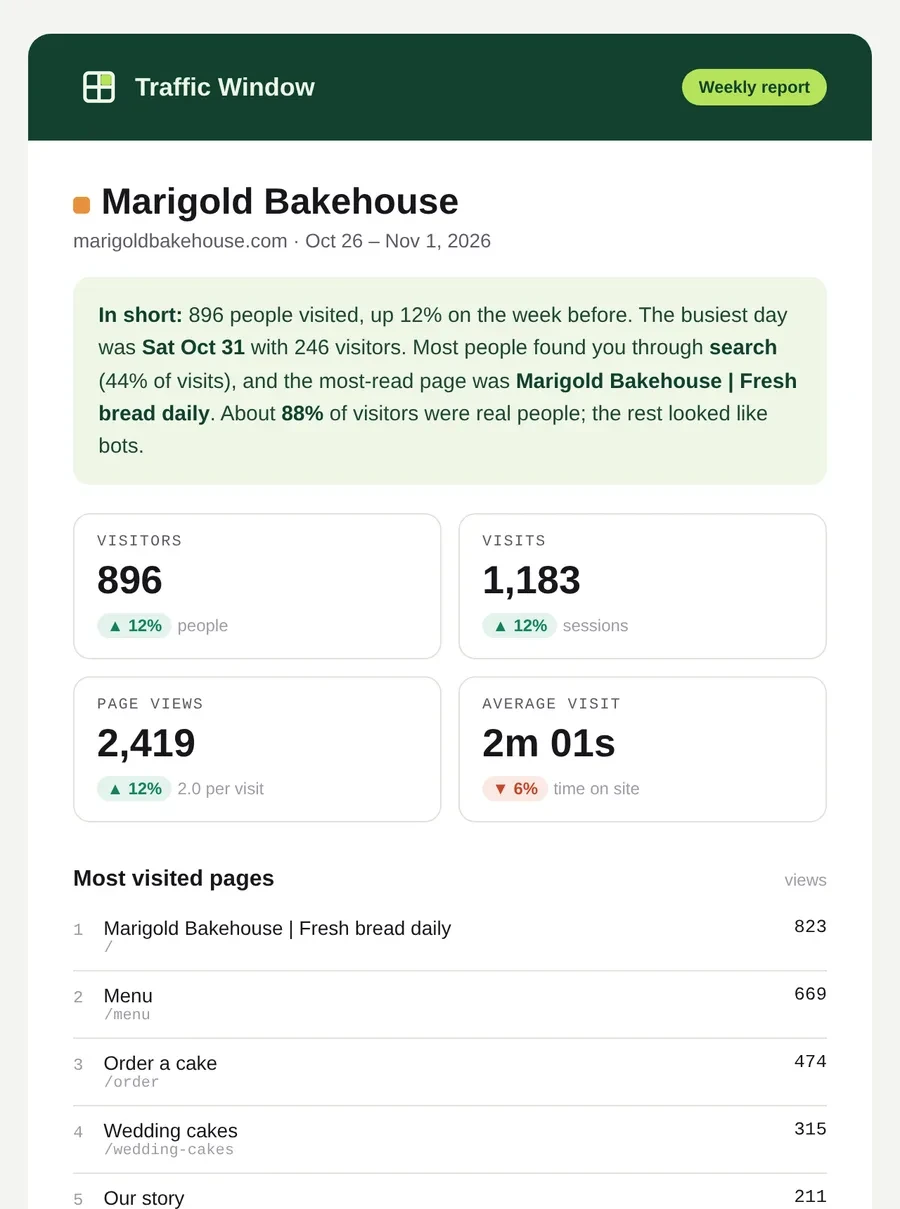
The highlights sit right in the email: the summary, four key numbers, the top pages and how people found the site. The full 3-page report is attached, and a button opens it online. It looks right in Outlook, Gmail and on a phone.

The weekly report email for Marigold Bakehouse: a green header, the In short summary, four numbers in tiles and the most visited pages
White label

Your logo. Your web address. Your clients never see our name.

Put Traffic Window on your own domain, such as stats.yourstudio.com, with your logo, your colours and your footer. Reports and emails go out under your name. To your clients, it's your own reporting service, part of the care plan you already sell them.

  • Your own domain: you add one DNS record and we do the rest, security certificate included
  • Your logo and colours on the dashboard, the PDF and the email
  • Emails from your name, with replies coming to you
  • No "Traffic Window" anywhere your clients look

$7.99 a month on Solo or Studio, included with Agency.

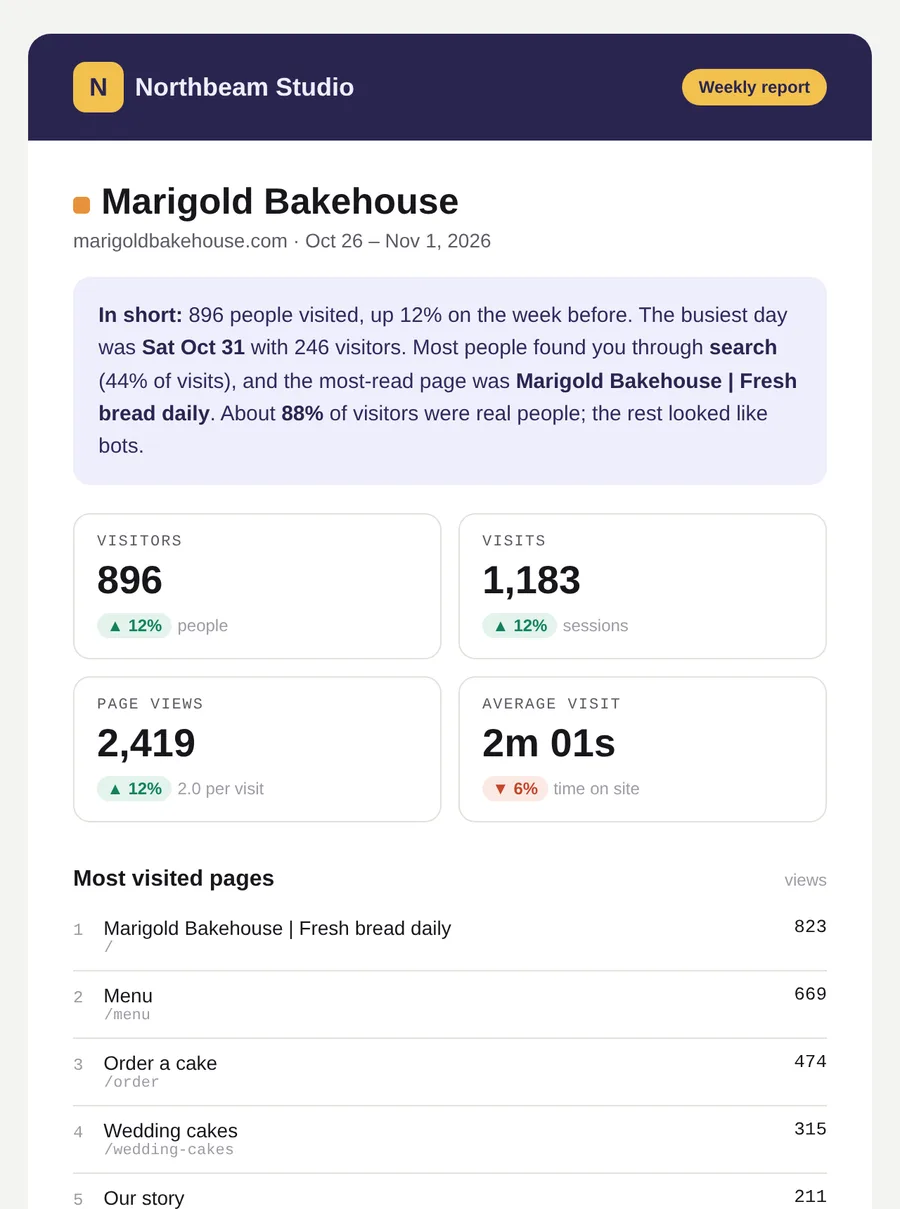
The same report with a made-up design studio's logo, colours and footer: Prepared by Northbeam Studio
The same email in the studio's own purple and gold, headed Northbeam Studio
One site up close

Click a site and see everything about it.

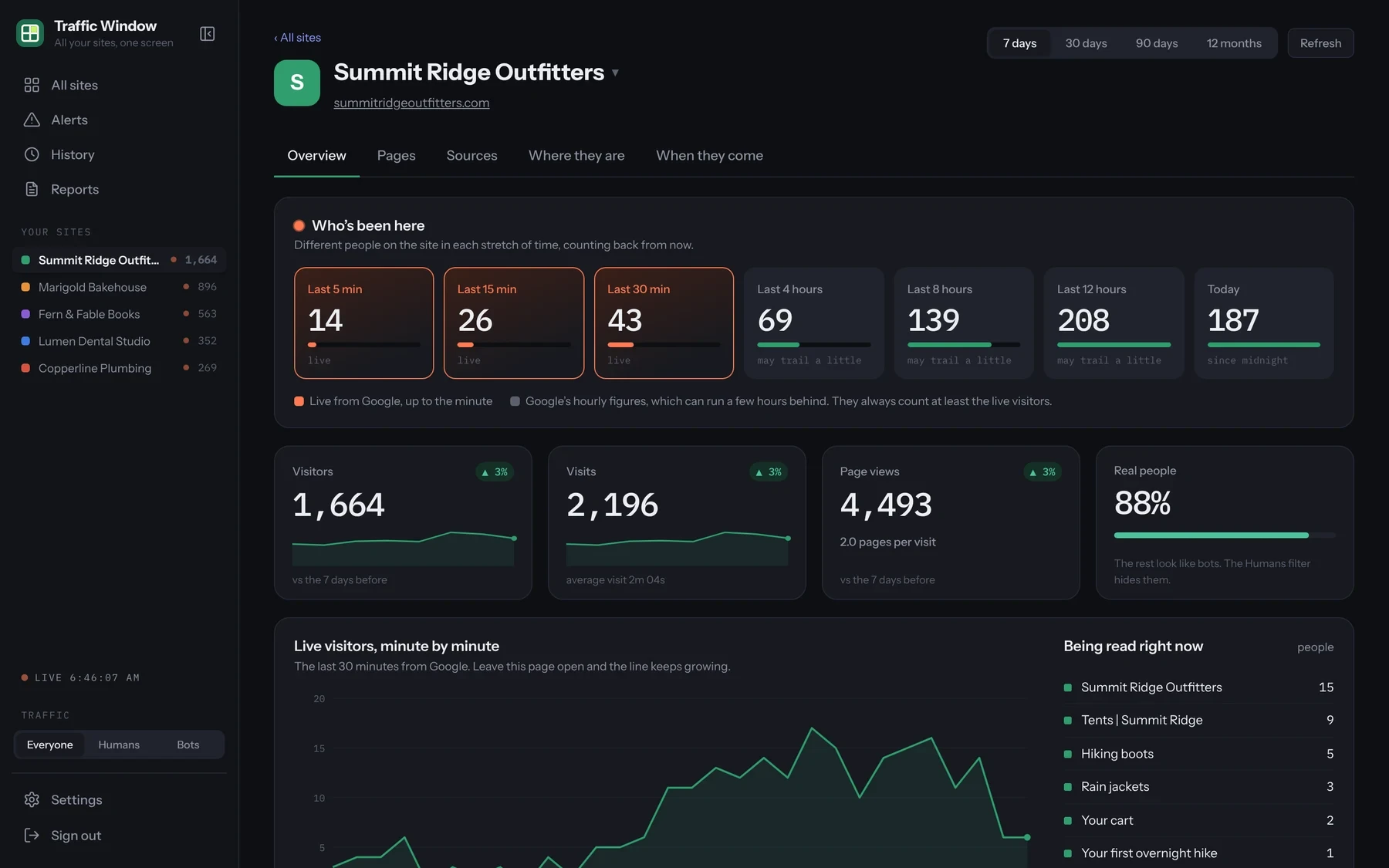
Visitors in the last 5 minutes, 15 minutes, 30 minutes, 4, 8 and 12 hours, and today. A live line that moves minute by minute. Totals compared with the week before.

One site's page: visitors in each stretch of time, totals for the week and a live minute-by-minute line
Sources and places

Find out what's really bringing people in.

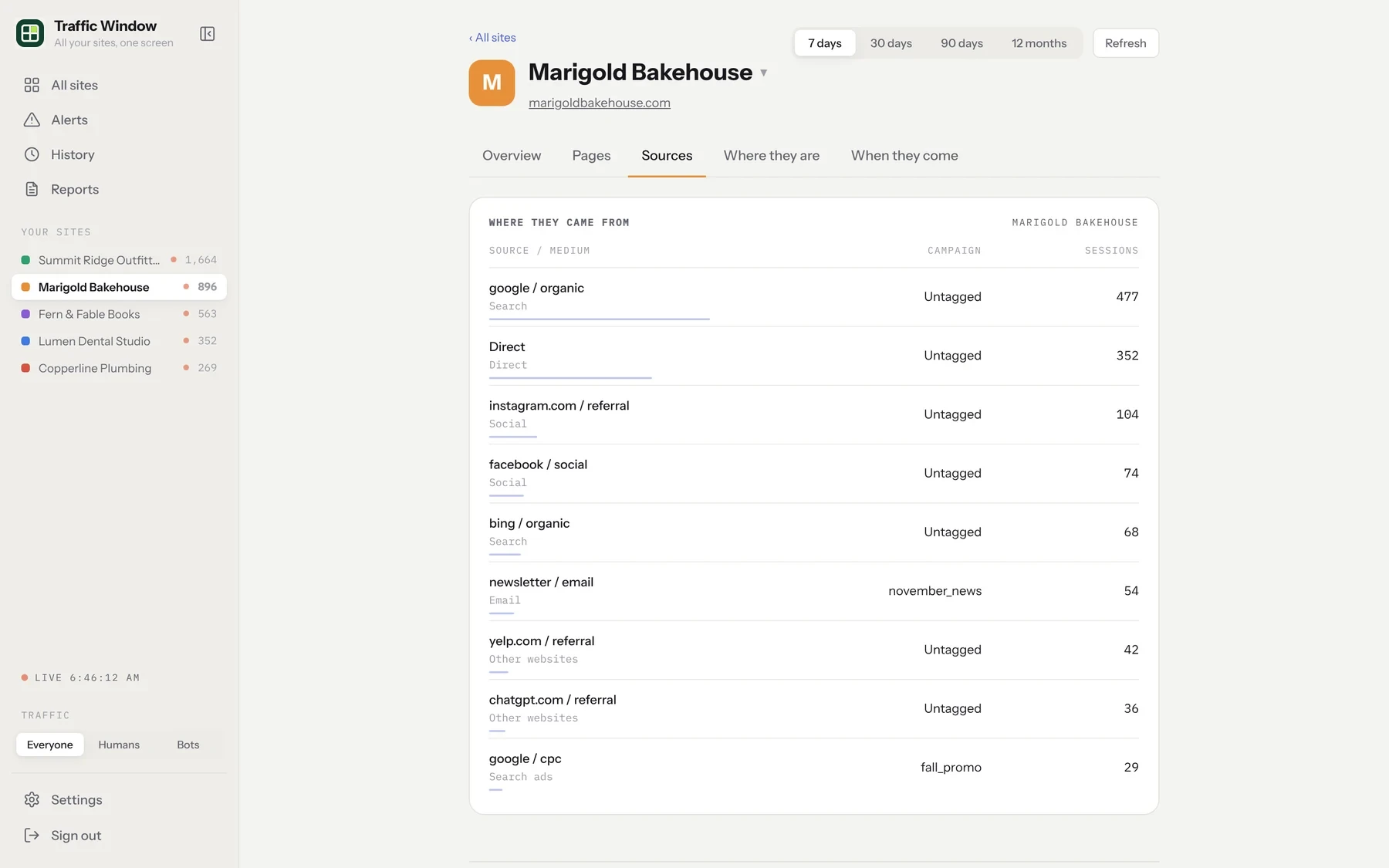
Search, social, email, ads and other websites, in order, with campaign names. A map of states, and the cities and countries visitors come from. Data-center cities are flagged, because a spike from there is usually bots.

The Sources tab: Google, direct, Instagram, Facebook, Bing, a newsletter campaign, Yelp, ChatGPT and Google ads, each with visits
Who it's for

Built for people who look after several sites.

Web designers and small studios

Look after 5 to 50 client sites? See them all at once, and send every client a report without the monthly screenshot chore.

Marketing consultants

A clean monthly PDF that shows each client what your work did, sent automatically.

Businesses with several sites

Locations, brands or a group of blogs, compared side by side on one screen.

Churches, schools and nonprofits

Anyone in the office can see how every site is doing. No training needed.

Getting started

Up and running in about five minutes.

Nothing to install on your clients' sites. Traffic Window reads the Google Analytics they already have.

Start your free trial

Pick how many sites you look after. Nothing is charged for 14 days.

Give Traffic Window "Viewer" access

In each client's Google Analytics, add our read-only email, the same way you'd add a colleague. Step-by-step guide.

Schedule the reports

Open Reports, pick a site, choose weekly or monthly and add your client's email. Done.

Questions

Good to know

Do I need to change anything on my clients' websites?

No. If a site already uses Google Analytics 4, Traffic Window reads the numbers from there. Nothing is installed on the site.

Who can I send reports to?

Anyone, at any email address: your client, their staff, their marketing person, or yourself. Each scheduled report goes to up to six people, and you can schedule as many reports as you like.

Can my clients tell the reports come from Traffic Window?

Without white label, reports carry a small "Sent with Traffic Window" line. With white label, everything is on your own domain with your logo and name, and Traffic Window doesn't appear anywhere.

Can Traffic Window change my clients' Google Analytics?

No. "Viewer" access can only read visitor numbers. It can't change settings, see other parts of a Google account, or touch the website.

What counts as a site?

Each Google Analytics property you add. If one property covers several web addresses, like shop.example.com and blog.example.com, you can show them as separate sites.

What happens after the free trial?

Your plan starts and your card is charged monthly. Cancel before the 14 days are up and you pay nothing.

Give every client a report this month.

14 days free, then from $5.99 a month.

Start free trial